How to Create

Your Dooprime account

Step 1: Make an account DooPrime using the ff link:

  • Create MT4 CENT
  • Account(CENT)
  • Leverage 1:1000


Note

– It is best to create your account under the Philippines if you are from the following countries: Canada, Malaysia, USA, UAE, Iran, Saudi Arabia and Singapore 

– To create a Philippine account, you need to have the following: Philippine Valid ID, contact number, depositing/withdrawal information (either bank account or Gcash) and VPN (tunnelbear, expressVPN)

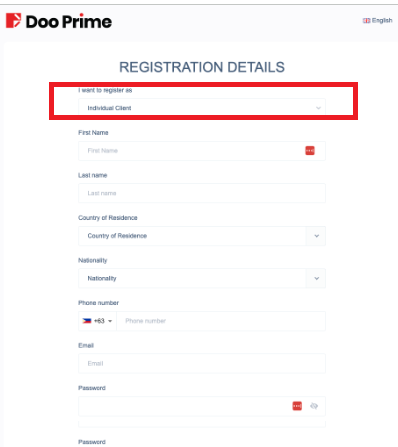
Step 2: Fill out the Registration Details

Choose Individual Client

Notes:
– Choose
Individual Client
 

Step 3- Watch video

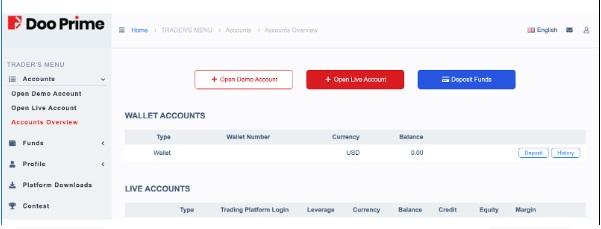
Step 4: Fund your account

Only 500 USD as starting capital .

Fund Recommended depends on the risk profile please check capital recommended below  we suggest to start with 500 USD.

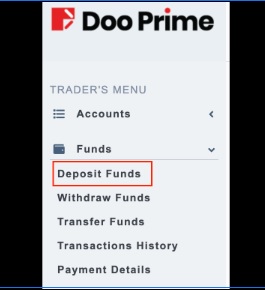
1. Click on Deposit Funds


Notes:
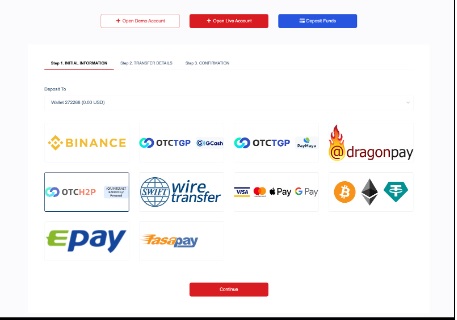
– If you are depositing via GCASH please choose dragonpay as your option
– If the option for the bank you wish to deposit to using Dragonpay is not available, it might be because of system maintenance or it is not available at the moment, please try again at a later time.
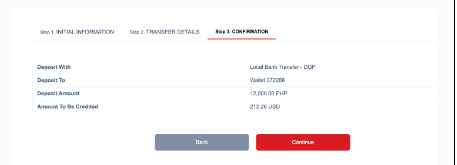
– Enter the amount you wish to deposit and click Continue


In this example, Gcash via Dragonpay is the option. Please follow the prompts of the payment gateway to proceed
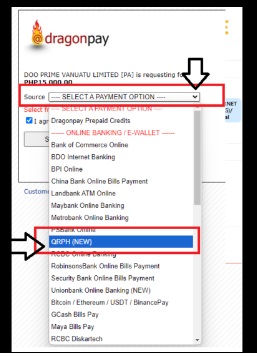
Wait for the amount to be credited to your Wallet

Note: This process is dependent on the payment gateway chosen and can be done within a few minutes to 3 days.

Join Traders PH